Uploading Images (Updated July 2017)
Posted: Tue Oct 20, 2015 10:47 pm
To add images to your posts you will first need to upload your images to a hosting website and then embed the image code within your forum post. To the less technically minded this may sound a little daunting but it's quite straight forward once you know how. There are many websites that you can use to host your images, below are some examples together with step by step instructions on how to use them.
Alternatively, if you capture your images on your smart phone you can use a forum app called Tapatalk. Tapatalk is by far the easiest way to add images to your posts as you will see from the instructions below.
Imgur
http://www.imgur.com
You’ll need to create an account (it's free) and upload your pics (obviously).
1)To add images, the quickest way is to simply drag and drop images directly onto the home page. Alternatively, hover over your account name (top right) to reveal a drop down menu, then click on images.

2) Then simply click on Add Images. Either drop and drag images or use the browser to locate and add your images.

To embed an image in a forum post simply follow these steps:
1) View your images by hovering over your account name (top right) and then click on images (as explained in point one above):
2) Click on the image you wish to embed within your post. A series of codes will be listed to the right of the image. The code that you need to copy is the BBCODE. Simply click on the BBCODE Copy button.

3) Paste this code into your post

This is the final image posted via Imgur.

There's also a bit of nifty functionality allowing GIF's to be created from video.

--------------------------------------------------------------------------------------------------------------------------------------
Flickr
http://www.flickr.com
You’ll need to create an account (it's free) and upload your pics (obviously).
To embed an image in a forum post simply follow these steps:
1) View your images as shown below:

2) Click on the image you want to embed within your post and then click on the “Share photo” arrow icon at the bottom right hand corner

3) Select BBCode from the code options, then using the dropdown menu select the size of the image (Medium appears to be a good size for the forum), then copy the code (either a right click on the mouse then selecting copy, or press Ctrl+C)

4) If the full code is pasted into the body of the message then each image will include an image tag

5) To remove the image tag, delete the code that’s wrapped around the image coding - only the image will then be posted

This is the final image posted via Flickr.

--------------------------------------------------------------------------------------------------------------------------------------
Tapatalk
For iPhone: https://itunes.apple.com/us/app/tapatal ... bucket.com
For Android: https://play.google.com/store/apps/deta ... y&hl=en_GB
1) Download the Tapatalk app to your smart phone
2) Search for and add Wirral Sea Fishing forum
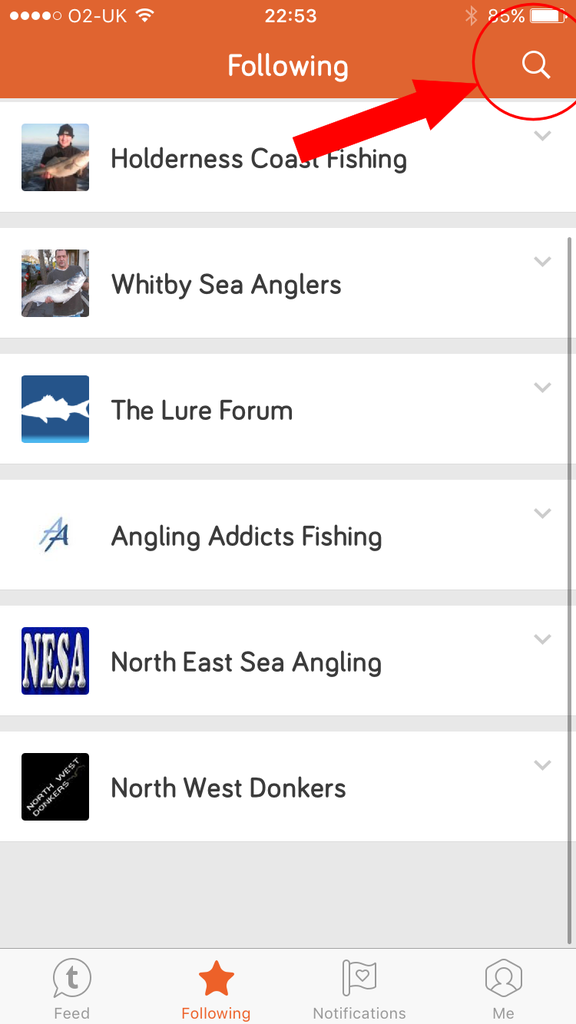
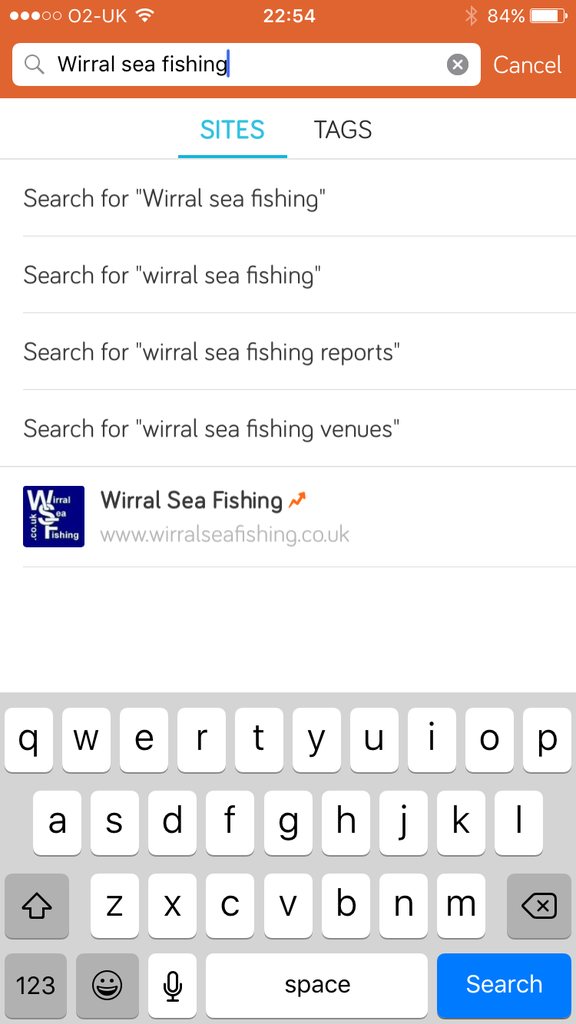
3) Log in using your usual WSF login details
4) Add pictures to posts in the same way you would add a picture to a text message, i.e:
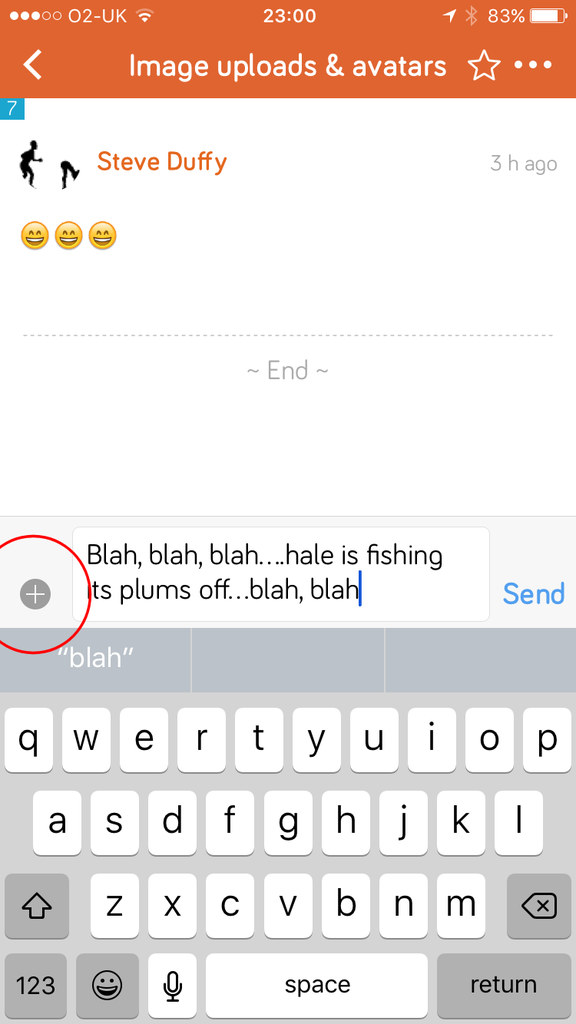
4.1) Tap on the + symbol at the left hand side of the text box
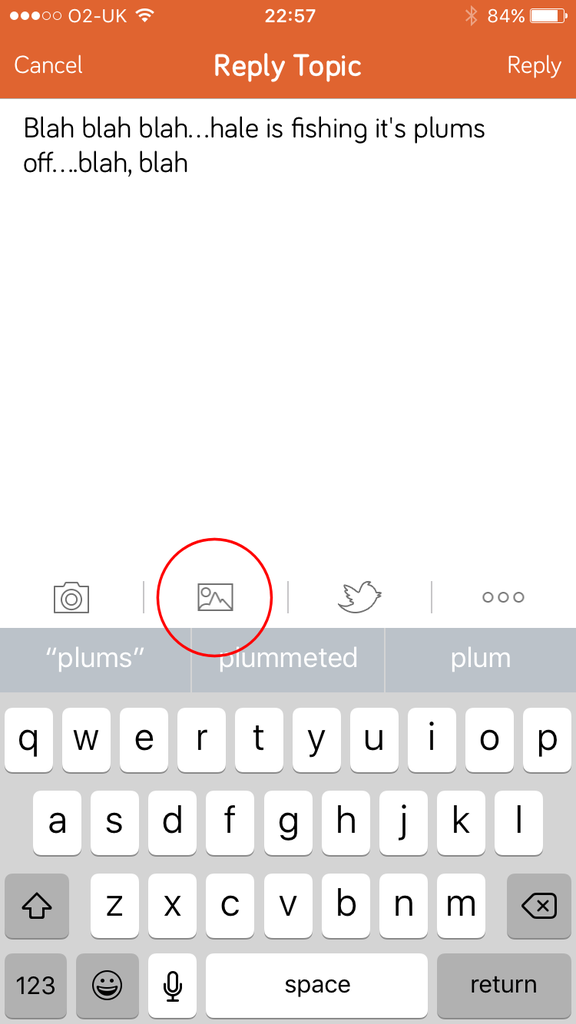
4.2) Tap the landscape icon to browse the images on your phone
4.3) Tap on the image you wish to embed in your post
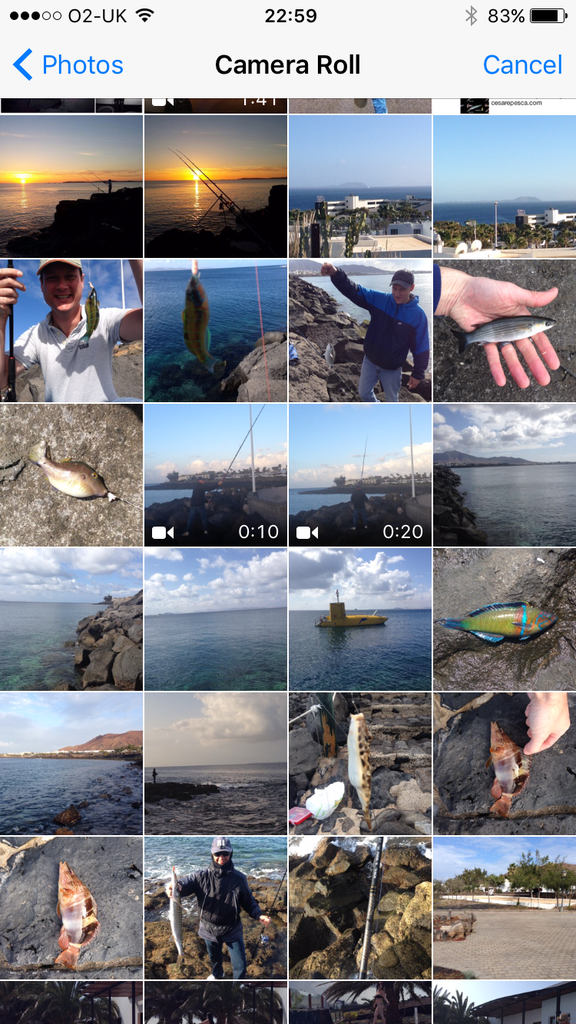
4.4) The image code will be shown within your post

4.5) Tap post or reply at the top right of the screen

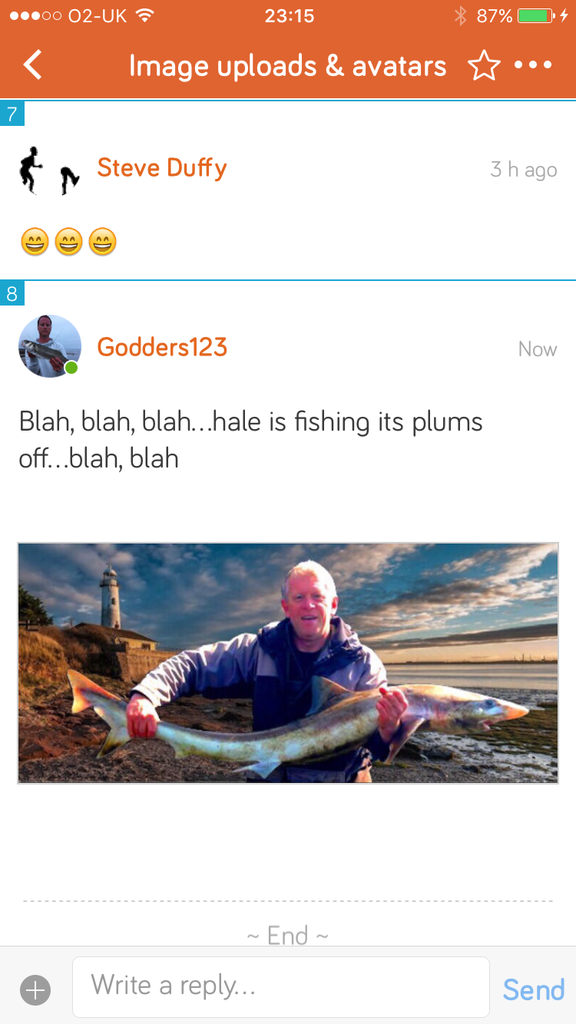
This is the final image as posted via Tapatalk.
Alternatively, if you capture your images on your smart phone you can use a forum app called Tapatalk. Tapatalk is by far the easiest way to add images to your posts as you will see from the instructions below.
Imgur
http://www.imgur.com
You’ll need to create an account (it's free) and upload your pics (obviously).
1)To add images, the quickest way is to simply drag and drop images directly onto the home page. Alternatively, hover over your account name (top right) to reveal a drop down menu, then click on images.
2) Then simply click on Add Images. Either drop and drag images or use the browser to locate and add your images.
To embed an image in a forum post simply follow these steps:
1) View your images by hovering over your account name (top right) and then click on images (as explained in point one above):
2) Click on the image you wish to embed within your post. A series of codes will be listed to the right of the image. The code that you need to copy is the BBCODE. Simply click on the BBCODE Copy button.
3) Paste this code into your post
This is the final image posted via Imgur.
There's also a bit of nifty functionality allowing GIF's to be created from video.
--------------------------------------------------------------------------------------------------------------------------------------
Flickr
http://www.flickr.com
You’ll need to create an account (it's free) and upload your pics (obviously).
To embed an image in a forum post simply follow these steps:
1) View your images as shown below:
2) Click on the image you want to embed within your post and then click on the “Share photo” arrow icon at the bottom right hand corner
3) Select BBCode from the code options, then using the dropdown menu select the size of the image (Medium appears to be a good size for the forum), then copy the code (either a right click on the mouse then selecting copy, or press Ctrl+C)
4) If the full code is pasted into the body of the message then each image will include an image tag
5) To remove the image tag, delete the code that’s wrapped around the image coding - only the image will then be posted
This is the final image posted via Flickr.
--------------------------------------------------------------------------------------------------------------------------------------
Tapatalk
For iPhone: https://itunes.apple.com/us/app/tapatal ... bucket.com
For Android: https://play.google.com/store/apps/deta ... y&hl=en_GB
1) Download the Tapatalk app to your smart phone
2) Search for and add Wirral Sea Fishing forum


3) Log in using your usual WSF login details
4) Add pictures to posts in the same way you would add a picture to a text message, i.e:
4.1) Tap on the + symbol at the left hand side of the text box

4.2) Tap the landscape icon to browse the images on your phone

4.3) Tap on the image you wish to embed in your post

4.4) The image code will be shown within your post

4.5) Tap post or reply at the top right of the screen

This is the final image as posted via Tapatalk.


